Facade Entry Point
Esta página aún no está disponible en tu idioma.
Facade Entry Point
Section titled “Facade Entry Point”The wippy/facade backend module is the entry point that delivers the Web Host to users. It serves an HTML page that loads the Web Host JS module, handles authentication redirects, exposes a /facade/config endpoint, and bridges deployment-specific configuration into the CDN-hosted frontend bundle. No configuration is baked into the bundle itself — every deployment provides its own config through this mechanism.
The HTML Page
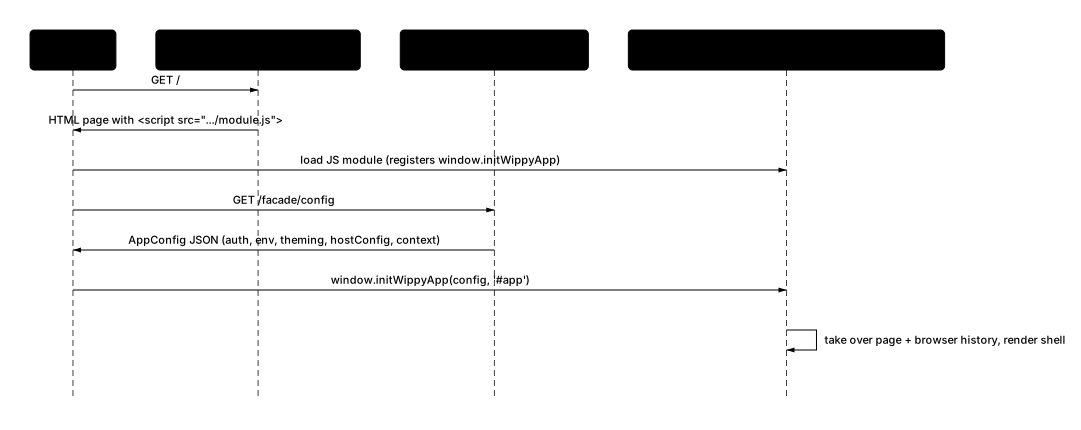
Section titled “The HTML Page”When a user navigates to a Wippy application, wippy/facade serves an HTML page. This page is thin: it loads a Web Host JS module from the CDN and initializes the host with the configuration returned from /facade/config. The module takes over the entire page — including its browser history — so the host runs as the whole application rather than inside an iframe.
The facade loads one of two JS-module entries depending on the configured fe_mode:
module.js— the compat shell (default): the standard nav-sidebar + page-area + chat-right-panel layout.managed-layout.js— the managed shell (opt-in, early access): the declarative multi-panel layout.
A simplified version of the page looks like this:
<!DOCTYPE html><html><head> <title>My App</title></head><body> <div id="app"></div> <script src="https://web-host.wippy.ai/<release-tag>/module.js"></script> <script> fetch('/facade/config') .then(r => r.json()) .then(config => { window.initWippyApp(config, '#app') }) </script></body></html>The page fetches its configuration and hands it to the module’s init function. The host mounts into the page, takes over routing and browser history, and proceeds with full initialization.
Note on the fetch path.
/facade/configis the path the facade registers on the public router; the actual URL your page fetches includes that router’s prefix. With the example prefix/api/public, it is/api/public/facade/config— exactly what the shipped facade page fetches. The inlinefetch('/facade/config')snippets here are shortened for readability.
The Config Flow
Section titled “The Config Flow”The config flow has two steps:
- The page’s inline JavaScript calls
GET /facade/configon the same origin as the page. This endpoint is registered bywippy/facadeon the public router. - On response, the page passes the full config object to the loaded JS module’s init function (
window.initWippyApp(config, rootContainer?)).
The Web Host extracts the AppConfig payload from the config object and proceeds with full initialization. From this point forward the page script is passive — all user interaction happens inside the mounted host.
This pattern means the CDN-hosted bundle never contains deployment-specific URLs, tokens, or branding. The bundle is identical for every deployment. Only the config payload differs.
Shell fields vs child
AppConfig. The/facade/configresponse carries both. Fields likefacade_url,iframe_origin,iframe_url, andlogin_pathare shell-level fields consumed by the embedding page to build itself — they are not part of the childAppConfig. TheAppConfigthe host actually initializes with isauth,env,theming,hostConfig,context, and the other fields documented below.
The /facade/config Response
Section titled “The /facade/config Response”The config endpoint returns a JSON object carrying both the shell-level fields and the child AppConfig. The facade page passes it to the host module’s init function; a manual iframe embedding instead delivers the AppConfig portion over PostMessage (see below). All fields are assembled by wippy/facade from its module parameters and the running environment:
{ "$schema": "wippy-context-2.0", "facade_url": "https://web-host.wippy.ai/<release-tag>", "iframe_origin": "https://web-host.wippy.ai", "iframe_url": "https://web-host.wippy.ai/<release-tag>/iframe.html?waitForCustomConfig", "login_path": "/login.html", "auth": { "token": "eyJ...", "expiresAt": "2026-06-01T12:00:00Z" }, "env": { "APP_API_URL": "https://api.example.com", "APP_AUTH_API_URL": "https://api.example.com", "APP_WEBSOCKET_URL": "wss://api.example.com" }, "routePrefix": "https://api.example.com", "axiosDefaults": {}, "apiRoutes": {}, "tanstack": { "lists": { "refetchOnWindowFocus": true } }, "theming": { "global": { "customCSS": "@import url('https://fonts.googleapis.com/...');", "cssVariables": { "--p-primary": "#6366f1" }, "iconSets": {} }, "host": { "customCSS": ".wippy-host-app .chat-container { background: var(--p-surface-100); }", "cssVariables": {}, "iconSets": {}, "i18n": { "app": { "title": "My App", "icon": "wippy:logo", "appName": "My Application" } } }, "children": { "customCSS": "", "cssVariables": {} } }, "hostConfig": { // example values — defaults shown in table below "session": { "type": "non-persistent" }, "history": "hash", "showAdmin": true, "allowSelectModel": false, "startNavOpen": false, "hideNavBar": false, "disableRightPanel": false, "hideSessionSelector": false, "additionalNavItems": [], "stateCache": {}, "allowAdditionalTags": [], "chat": {} }, "context": { "resourceId": "root", "resourceType": "page", "route": "/" }}Field Reference
Section titled “Field Reference”Shell-level fields — consumed by the embedding page to build itself; not part of the child AppConfig:
| Field | Description |
|---|---|
facade_url | Base CDN URL for the Web Host bundle. Used to resolve the module entry and vendor scripts. |
iframe_origin | Origin header value of the CDN. Used as the targetOrigin for PostMessage in manual iframe embeddings (see below). |
iframe_url | Full iframe src including ?waitForCustomConfig. Used only by manual, facade-less iframe embeddings (see below). |
login_path | Path on the page’s origin to redirect unauthenticated users to. |
Child AppConfig fields — passed to the host’s init function and consumed by the running host:
| Field | Description |
|---|---|
$schema | Config contract version ("wippy-context-2.0"). |
auth | Runtime bearer token and expiry injected as AppConfig.auth. |
env | Runtime URLs injected as top-level AppConfig.env. |
routePrefix | API URL prefix forwarded to child apps. |
axiosDefaults | Axios instance defaults forwarded to child apps. |
apiRoutes | Override individual API endpoint paths (top-level AppConfig field). |
tanstack | TanStack Query defaults — global + per role-based category (content/lists); top-level AppConfig field. Host default is refetchOnWindowFocus:false. |
theming | CSS customization split into three scopes. |
hostConfig | Web Host feature flags and UI configuration. |
context | Initial page or artifact context for the host. |
env fields:
| Field | Source | Description |
|---|---|---|
APP_API_URL | PUBLIC_API_URL env var | Base URL for all backend HTTP calls |
APP_AUTH_API_URL | Same as APP_API_URL | Auth endpoint URL (may differ in custom setups) |
APP_WEBSOCKET_URL | Derived from APP_API_URL | http:// → ws://, https:// → wss:// |
theming scopes:
| Scope | Applied to |
|---|---|
global | Both the host chrome and all child iframes |
host | Host chrome only. Also carries i18n.app for the app title, icon, and name shown in the sidebar. |
children | Child iframes only (injected by the proxy script) |
hostConfig fields:
| Field | Type | Default | Description |
|---|---|---|---|
session.type | "non-persistent" | "cookie" | "non-persistent" | Token storage mode |
history | "hash" | "browser" | "hash" | Vue Router history mode |
showAdmin | boolean | true | Show admin features in UI |
allowSelectModel | boolean | false | Show LLM model picker |
startNavOpen | boolean | false | Expand nav sidebar on load |
hideNavBar | boolean | false | Hide left navigation sidebar entirely |
disableRightPanel | boolean | false | Disable right artifact panel |
hideSessionSelector | boolean | false | Hide the chat session picker |
additionalNavItems | array | [] | Extra items injected into the sidebar |
stateCache | object | {} | LRU cache config for child iframe state |
allowAdditionalTags | object | {} | HTML sanitizer tag whitelist (Record<string, string[]>, tag → allowed attributes) |
chat | object | {} | Chat UI overrides (paste-to-file behavior, etc.) |
Authentication Flow
Section titled “Authentication Flow”If the user is not authenticated when they load the page, wippy/facade redirects to login_path before serving the HTML page. After login succeeds, the user is returned to the original URL. No authentication state is passed through the Web Host config itself — the Web Host trusts the auth token embedded in auth/env by the authenticated page response.
Because the config endpoint is served by the same authenticated session that served the HTML page, APP_API_URL and the derived WebSocket URL automatically reflect the correct backend for that user.
The Module Init Function
Section titled “The Module Init Function”The JS-module entry registers window.initWippyApp on the page. The facade page calls it with the config object fetched from /facade/config. fe_mode selects which module the facade loads — module.js for compat, managed-layout.js for managed — and both expose the same initWippyApp entry function. The choice of module is about which shell renders; it is independent of the embedding style (JS-module page vs manual iframe).
initWippyApp(config, rootContainer?) returns a simple event emitter:
const events = window.initWippyApp(config, '#app')events.on('ready', () => console.log('Wippy loaded'))events.on('error', err => console.error('Failed to load:', err))When called without a root container, the host mounts into a default element. The host takes over the page and its browser history from this point forward.
Manual (facade-less) iframe embedding
Section titled “Manual (facade-less) iframe embedding”The JS-module page above is the standard, recommended path and the one the current facade uses. There is also a second embedding mechanism for cases where you want to run the full host inside an iframe — for example to occupy only part of a page with stronger isolation from the surrounding application. In this mode you embed the host yourself; the facade does not produce this page.
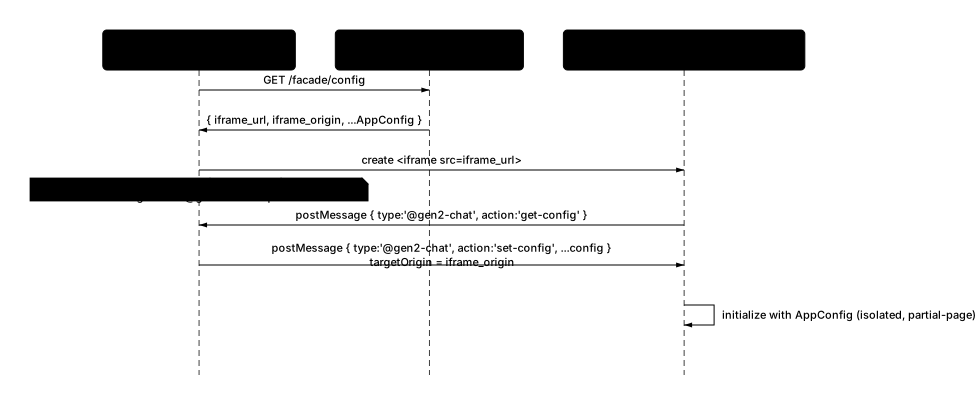
You can still reuse the facade’s /facade/config endpoint to obtain the URLs and config: its iframe_url (the host’s iframe.html entry with ?waitForCustomConfig already appended) and iframe_origin (the targetOrigin for PostMessage) exist for exactly this path. You then create the iframe yourself and complete the config handshake.
Unlike the JS-module path, the host inside the iframe requests its config: it boots and posts a get-config message to the parent, and the parent replies with set-config. So the parent listens for the request rather than pushing config blindly on load:
<!DOCTYPE html><html><head>  <title>My App</title></head><body>  <iframe id="wippy" style="width:100%;height:100vh;border:none"></iframe>  <script>    fetch('/facade/config')      .then(r => r.json())      .then(config => {        const iframe = document.getElementById('wippy')
        // Listen for the child's @gen2-chat config request, then answer it.        window.addEventListener('message', (event) => {          if (event.origin !== config.iframe_origin) return          const msg = event.data          if (msg?.type === '@gen2-chat' && msg.action === 'get-config') {            iframe.contentWindow.postMessage(              { type: '@gen2-chat', action: 'set-config', ...config },              config.iframe_origin            )          }        })
        // iframe_url already includes ?waitForCustomConfig        iframe.src = config.iframe_url      })  </script></body></html>
The ?waitForCustomConfig query parameter (already present in iframe_url) is the key signal. It tells the Web Host to pause initialization — the app mounts but deliberately does not attempt to resolve authentication or load routes until it receives a set-config message. Without it the Web Host would try to read auth tokens from URL parameters or defaults, which is not appropriate for embedded deployments.
The handshake uses the @gen2-chat PostMessage protocol:
- The parent fetches
GET /facade/config(or supplies an equivalentAppConfigpayload itself) and creates the iframe pointing atiframe_url. - The booting iframe posts
{ type: '@gen2-chat', action: 'get-config' }to the parent. - The parent’s
messagelistener responds with{ type: '@gen2-chat', action: 'set-config', ...config }, targeted atiframe_origin.
The Web Host extracts the AppConfig payload and proceeds with full initialization. For the full message protocol (@gen2-chat envelope and the IFrameMessageType enum), see Proxy & Isolation. This SetConfig handshake is specific to manual, facade-less embedding; the wippy/facade module loads the Web Host as a JS module instead.
Configuring the Facade Module
Section titled “Configuring the Facade Module”The wippy/facade parameters that produce the config response above are set in your _index.yaml. A real example from app-template:
- name: facade kind: ns.dependency component: wippy/facade version: '>=v0.5.37' parameters: - name: server value: app:gateway - name: router value: app:api.public - name: app_title value: Wippy App - name: app_name value: Wippy App - name: app_icon value: "wippy:logo" - name: show_admin value: "false" - name: hide_nav_bar value: "true" - name: login_path value: /app/login.html - name: session_type value: non-persistent - name: history_mode value: browser - name: custom_css value: "@import url('https://fonts.googleapis.com/css2?family=Poppins...'); body { font-family: 'Poppins', sans-serif; }" - name: css_variables value: '{"--p-primary":"#6366f1"}' - name: host_custom_css value: ".wippy-host-app .chat-container { background: var(--p-surface-100); }" - name: tanstack value: '{"lists":{"refetchOnWindowFocus":true}}'For the full list of available parameters and their defaults, see the Facade module reference.